The mock-up mode enables CUX users to completely anonymise data on users’ recordings and heatmaps – meaning, neither our tool nor the data provider will see ANY text or data on the website (it’ll all be covered with asterisks).
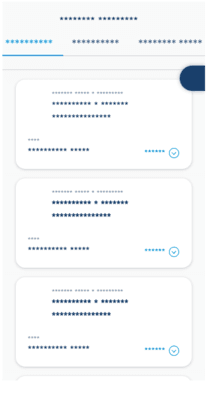 This feature is especially designed for finance, banking, insurance, and medical enterprise companies that handle sensitive data from their clients.
Important! Please note that this feature may affect your website’s performance. If you would like to thoroughly check its impact, you can request a performance test from our IT team. This service is available upon request - please contact sales@cux.io for details and a quote. Enterprise customers can access this service free of charge as it is already included in their subscription.
To enable mock-up mode: Log into your CUX account. Go to Settings>Integrate Code. Copy your project’s snippet. Add “mockupMode:true” to your snippet before implementing it on a website. Here’s the example of a snippet with added mock-up mode:
<script> (function(c,u,x,i,o){
c._cuxSettings=c._cuxSettings||{id:o:mockupMode:true};
var e=u.createElement(x),t=u.getElementsByTagName(x)[0];
e.src=i;e.async=true;t.parentNode.insertBefore(e,t);
c._cux_q=[];c._cux=c._cux||{send:function(n,p){c._cux_q.push({n:n,p:p,t:new Date()})}};
})(window, document, 'script', '//dc.cux.io/analyzer.js', '1428112091.0.06456300.1480349278.583c565e0fc5d');
</script>
Mock-up mode is activated within the snippet itself, meaning that this feature is fully under your control and can be modified only by people with direct access to your installed snippet.