See what’s new
We gave the CUX app a fresh new look. Experience metrics widget got an upgrade: You can now click ‘View More’ to open a full list of all pages where the selected pattern occurred, complete with device type and event counts.
Check details in the video
The Chaotic Movement widget displays the number of visits where chaotic computer cursor movements were detected. Chaotic Movements happen when visitors become lost or confused, leading them to move around the page frantically.
Example: In this example, you can see that chaotic movement occurred in 0.07% of all visits. Below the graph, you can see on which pages users performed chaotic movement and how many events took place.
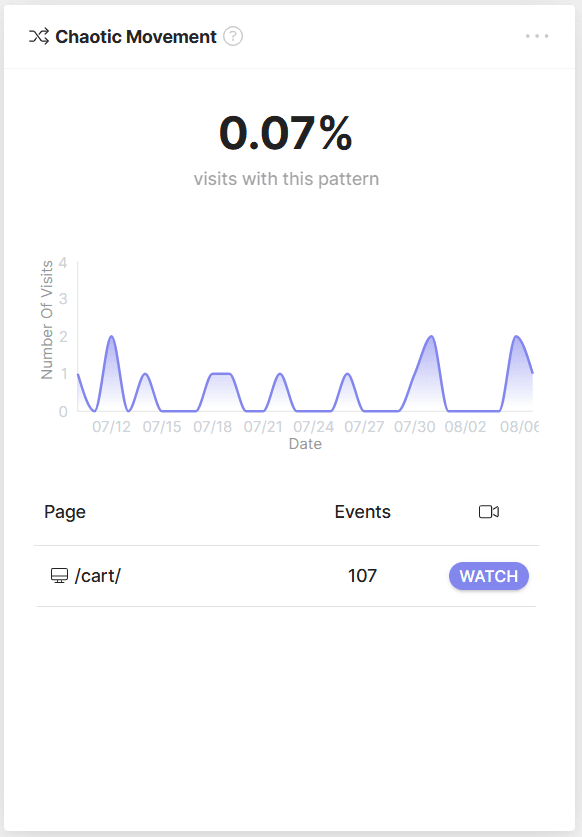
To understand what exactly evokes frustration in your visitors, you can view recordings of visits, during which a chaotic movement was detected.
What is Chaotic Movement on a Website? Chaotic Movement is a type of user behavior on a website where users make a lot of mouse movements during a single visit. These movements may not follow a logical path and indicate a lack of focus or confusion on the part of the user.
Why Do Users Exhibit Chaotic Movements on a Website? Users may exhibit Chaotic Movement on websites when they are confused, lost, or unable to find the information they need. They may move the mouse in different directions without a specific goal.
Why Should Website Owners Care About Chaotic Movement? Chaotic Movement can be a warning sign of a negative user experience, suggesting that users are not able to navigate the website easily. It can also indicate that users are unable to find what they are looking for, which may lead to increased bounce rates and decreased engagement on the website.
Real-World Chaotic Movement Example: Imagine someone is trying to get through a very complicated pricing page that is full of details and options. At some point, a user may experience a cognitive overload and start to move the cursor chaotically, expressing in this way their frustration and mental fatigue.