A dead click is a click that produces no visible response on the page. It can indicate an unresponsive control or an element that looks clickable but is not. Check the interaction in context before concluding that there is a technical fault.
See what’s new
We gave the CUX app a fresh new look. Experience metrics widget got an upgrade: You can now click ‘View More’ to open a full list of all pages where the selected pattern occurred, complete with device type and event counts.
Check details in the video
Dead click happens when clicking an element produces no action on the page due to technical issues, errors, or mistaking static elements as clickable.
Example: In the example below, you can see that Dead Clicks happened in 1.54% of all visits. Below the graph you can see which pages and devices have the highest number of visits with this Experience Metric.
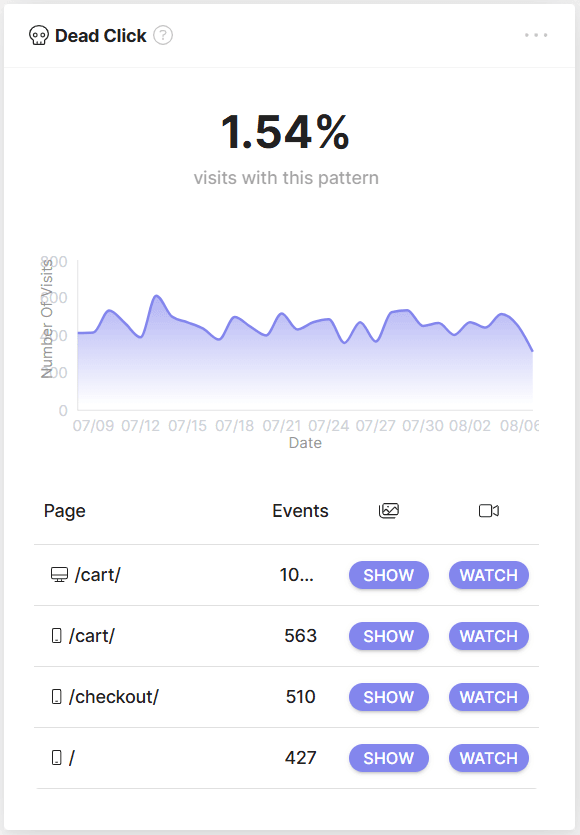
To see which parts of the page your visitors are dead clicking on, click 'SHOW' to see the heatmap or 'WATCH' to see a list of recordings, both with this Experience Metric happening on the selected page.
What is a Dead Click on a Website? Dead Clicks are a critical experience metric that highlights user frustration or technical issues on your website. This metric comes into play when a user clicks on an interactive element, such as a 'Buy Now' button or a navigation link, but the element fails to respond. It's similar to when you press a button on a remote control, and nothing happens on the TV screen.
Why Do We Dead Click on Websites? Dead Clicks can be attributed to technical glitches, errors in web design, or users inadvertently clicking on non-responsive elements.
Why Should Website Owners Care About Dead Clicks? Detecting Dead Clicks is essential for uncovering potential user frustrations, pinpointing problematic areas in your website's functionality, and enhancing the overall user experience.
Real-World Dead Clicks Example: Imagine you run a news website, and you notice that users frequently click on the headlines of articles in your homepage's featured section, but the articles fail to open upon clicking. This situation signals a technical issue that prevents users from accessing the content they're interested in. Identifying and resolving these Dead Clicks is crucial to prevent user frustration and maintain a positive user experience.