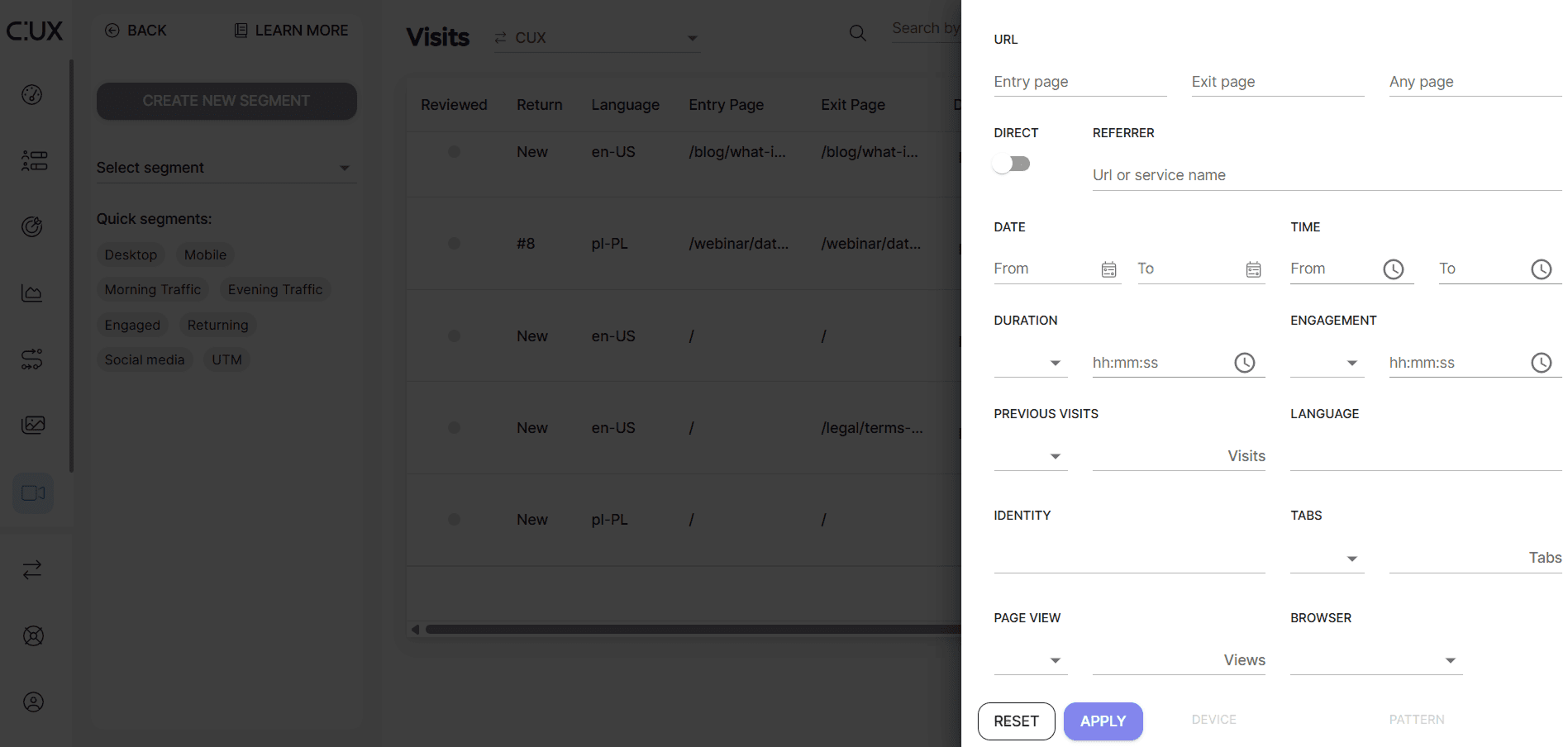
In CUX, you can freely filter visit recordings using many parameters, among them are:
- URL. Filter by: Entry Page, Exit Page, Any Page, Direct or Referrer traffic.
- Date. Filter by dates and times of a given visit.
- Activity. Filter by: Visit Duration (Greater than, Lesser than, Equals), Engagement (Greater than, Lesser than, Equals), Number of Previous Visits (Greater than, Lesser than, Equals), Browser Language, Identity, Number of Tabs opened (Greater than, Lesser than, Equals) or Number of Page Views (Greater than, Lesser than, Equals).
- Device. Filter by: type of Browser, Device, Operating System, Screen Width, and Height.
- Experience. Filter by Experience Metrics patterns (Rage Click, Rage Key Press, Refreshing, Chaotic Movement, Zoom).
- Saved recordings. Filter out only shared or saved recordings.
- Google Analytics 4 Session-ID (if you’ve enabled this integration).
 TIP: If you use the Any Page filter in combination with any Experience Metric from the Pattern filter, CUX will narrow down recordings to those where the specified Experience Metric is occurring on the designated page. When you click "Play," the recording will start from a timestamp shortly before the Experience Metric occurs.