See what’s new
We gave the CUX app a fresh new look. Heatmaps got an upgrade: Try the new “Snap to Element” functionality.
It aggregates clicks at the center of UI components they hit, making it easier to see which parts of the interface attract attention.
Check details in the video
A heatmap visually represents the most impactful user interactions on your pages. Each activity, whether it's a click, Experience metric or mouse movement, contributes to the intensity of a specific area. The places where users click to move their cursor most often are marked as hot areas. The places where users perform less actions are shown as colder green and blue colors. Regions without colors indicate no user activity in those areas.
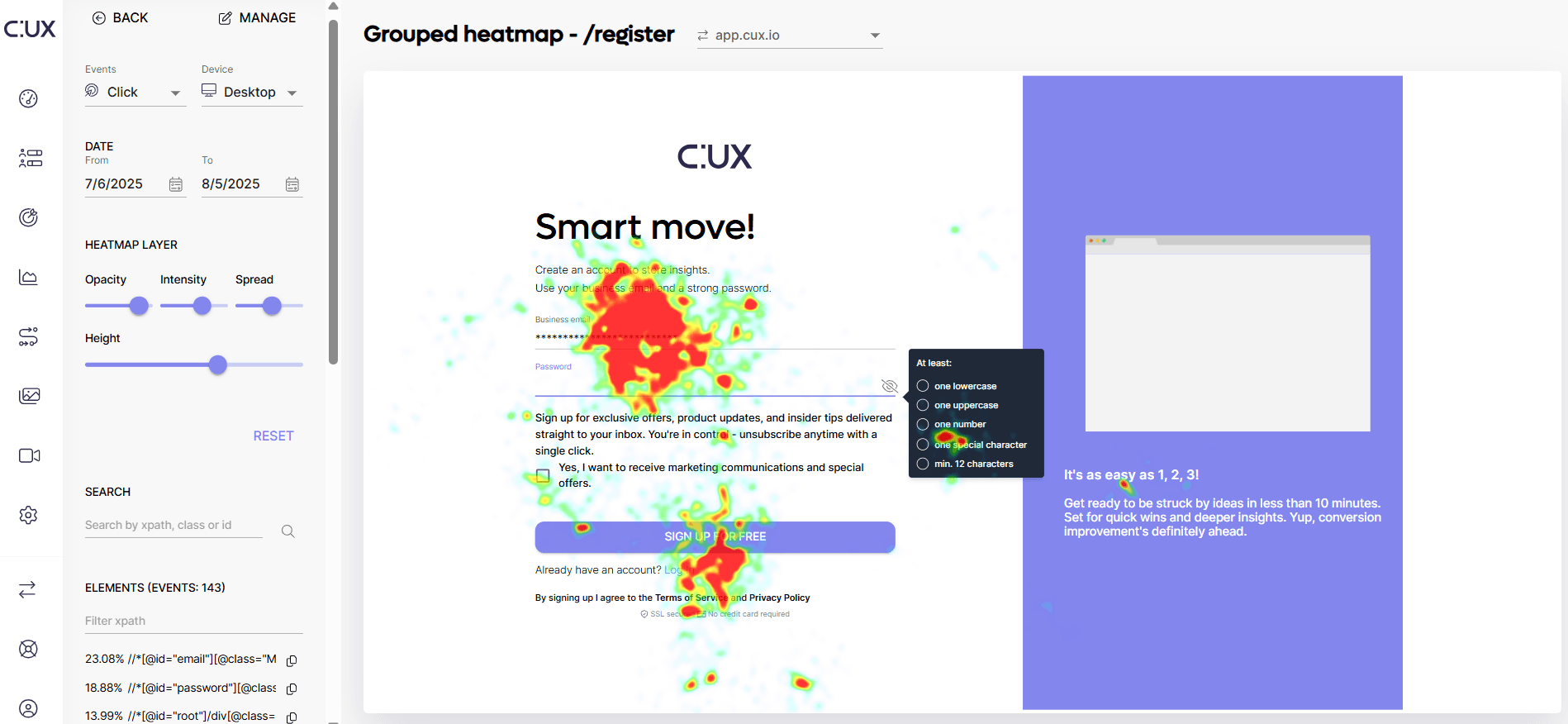
What does a heatmap show me? CUX heatmaps can show you the most valuable things that happen on your website:
- Where users click
- Where they move their cursor
- Where users don’t click (but were supposed to click)
- Are there clicks on elements that aren’t links?
- Are visitors clicking out of anger or frustration?
- What elements are being zoomed in or out?
- Are there broken elements on the page?
Heatmaps can be your website debugging help:
- You can find clicks on broken links or other elements that are supposed to have a response on click (dead clicks and rage clicks Heatmaps).
- You can identify missed opportunities to have links (dead clicks on non-clickable elements like icons or headers).
Why can't I access some of the heatmaps? Heatmaps are created out of user activity. We need to record and collect enough user clicks and mouse movements to show you meaningful results. The more visits to your page, the better the heatmaps are. You’ll see this yourself as time passes by, and the heatmaps show more reliable data.