Visit Recording is a replay of a user's actions in real-time created based on the interactions with your website. It tracks every movement of your user’s journey, from the moment they enter to the moment they close your website, no matter the number of tabs open. It shows you such user activity as: clicks, taps, scrolls, page loads and other interactions with a website.
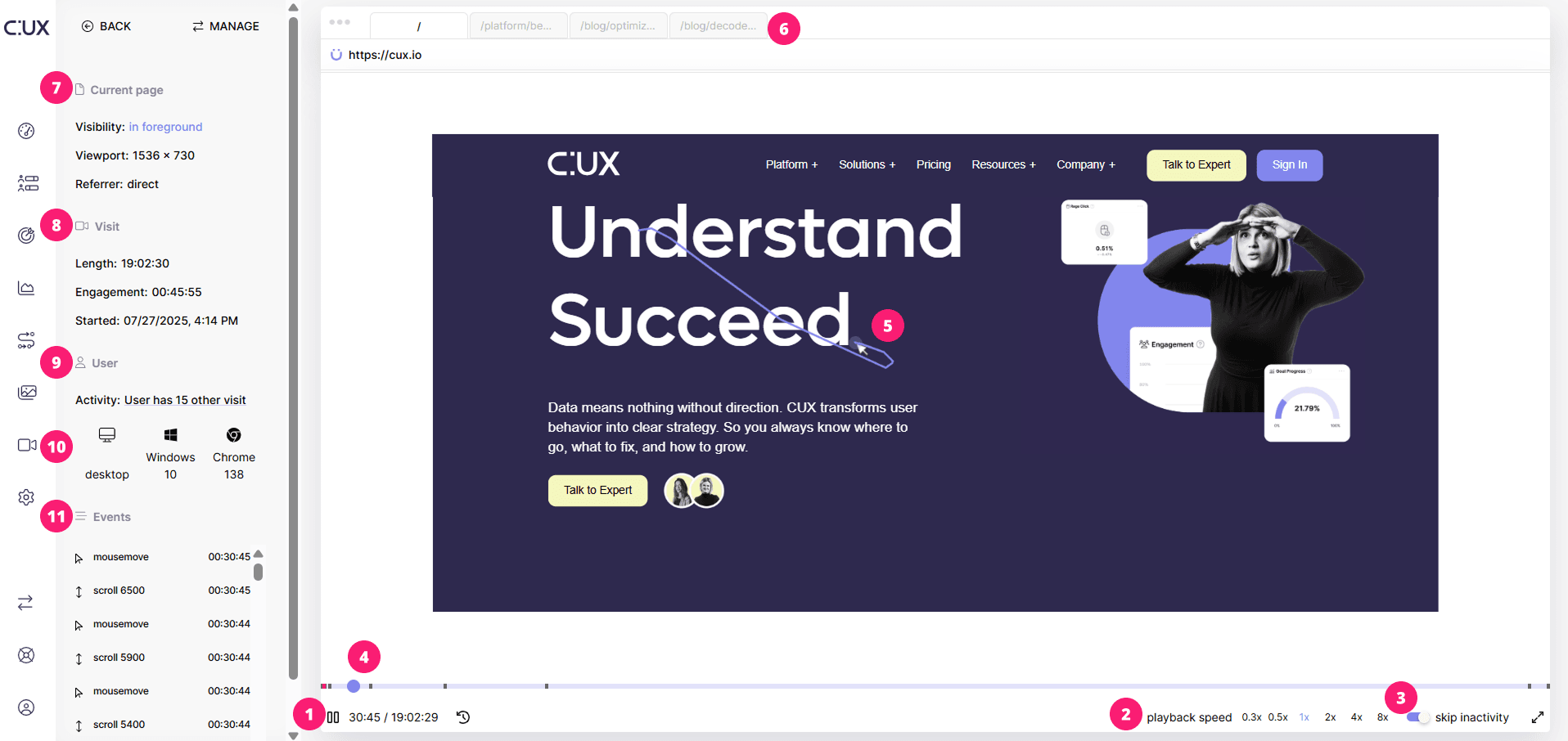 CUX Player allows you to watch replay of a given user visit. On a CUX Player screen you’ll find:
- Visit time. It shows at what point in the viewing you are, and how long the entire visit lasted. You can also use a rewind icon to go back 10 seconds, for example, if you want to replay a certain user action.
- Playback speed. You can freely increase or decrease the playback speed of the recording.
- Skip inactivity. To make it easier for you to analyze behavior, we omit (speed up) fragments in which the user was inactive by default. You can disable this option by clicking on the toggle.
- Timeline. The bar marked in dark purple shows the user's activity, the transparent bar indicates his inactivity, and the big purple dot is the moment of the recording which you are currently viewing. On a timeline, you'll also see other markers: black for page loads and pink for Experience Metrics. Hover over them to view their details.
- User cursor. The white arrow with a purple background is the cursor of the user whose recording you are watching. In this way, you can closely follow his actions on the site. When the cursor is moving, you will also see a purple trace that shows cursor movements for the last couple of seconds. This will help you track all cursor movements on any scale.
- Tabs. Here, you'll see all the tabs currently open on your website as viewed by a user. You can also easily identify the active tab and those that are open in the background.
- Current page. Here we display the most important information about the site.
- Visibility. Whether the page was open in the active tab or in the background.
- Viewport. Check what screen resolution was used by the user browsing your website.
- Referrer. Information about the source of the visit, if it came from external links.
- Visit. The most important information about the analyzed visit.
- Length. The total duration of the user's visit.
- Engagement. The time during which the user was active on the page (performed actions).
- Started. The exact date and time of the start of the visit.
- User Activity. Check how many times the same user visited your page. After clicking on this metric, you will be taken to the full list of recorded visits made by this user. Note that this section will appear only if a user has more than one visit to your site.
- Device. Check what device, operating system, and browser the user was using.
- Events. A list of all events (interactions) that happened during the user's visit along with the exact time they appeared on the visit recording.