All available heatmaps can be found on a Heatmaps page in an app. But besides a list of URLs this page offers a few other features that will make your analysis faster and easier.
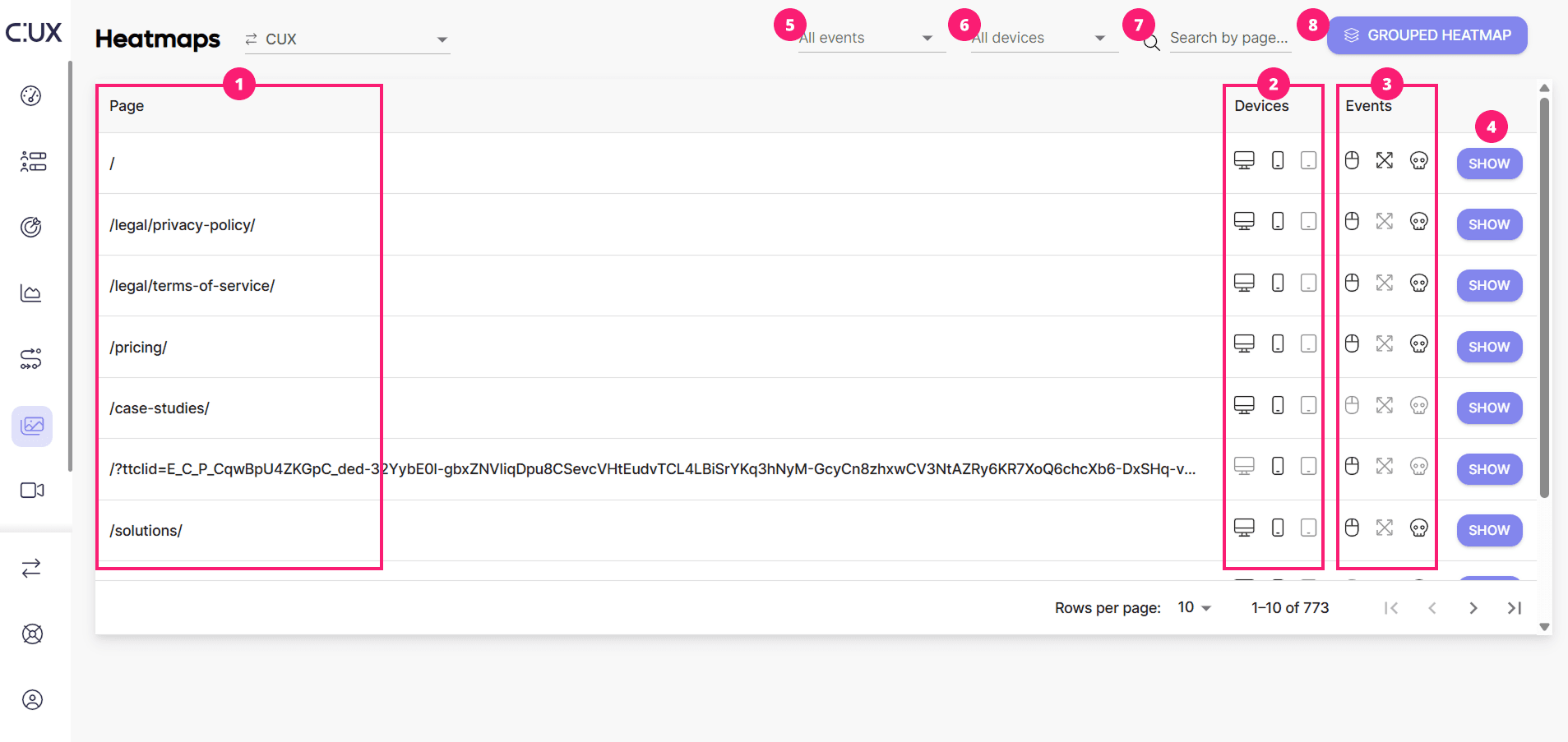
Here’s what you'll find on a Heatmaps page:
- List of Pages: This section displays every page from your site that was visited at least once within your retention period.
- Devices: It lists the devices on which the page was loaded. You can click on a device icon to jump directly to this type of heatmap. Some icons may be inactive, which occurs when CUX doesn't have enough events to generate a heatmap for that device.
- Experience Metrics Events: In addition to regular clicks or cursor movements, CUX provides heatmaps for specific Experience Metrics like Rage Clicks, Zooming, and Dead Clicks. If there are enough events to generate a heatmap, the icon will be active. This allows you to investigate the source of frustration or a poor user experience.
- Show Button: Click this button to view a heatmap for a selected page URL.
- Events Filter: Use this to filter pages that have received a selected type of Experience Metric event.
- Devices Filter: This feature allows you to filter heatmaps available on a selected device.
- Page URL Search: Type in a relative page URL or part of it to search for specific heatmaps.
- Grouped Heatmap: This is a feature that allows you to aggregate events from a few pages or URLs in one heatmap. For more information about this feature, refer to the dedicated section below.