On this page
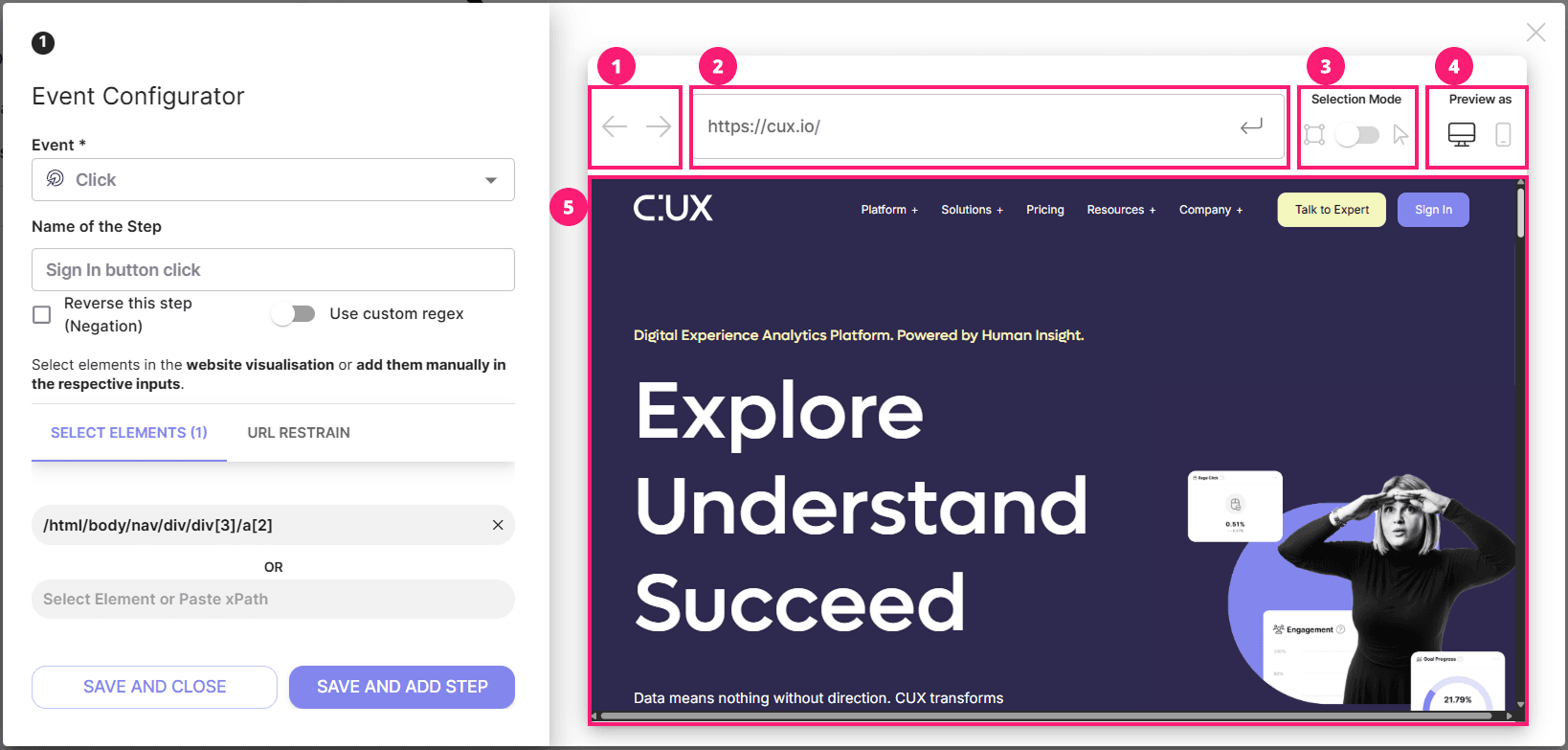
Visual editor is a part of the Click and Form events configurator. Its main purpose is to help you track clicks on elements or interactions with forms effortlessly. Just hover over the element you want to track and click. CUX will automatically fetch the xPath needed to track the action around that element.
The Visual editor consists of:
- Navigation arrows. These two arrows will help you to navigate back (the left arrow) to a previously viewed webpage or forward (the right arrow) to more currently viewed webpages.
- Address bar. It is a text field that shows you the current URL you are previewing in the visual editor and helps to quickly navigate through your website. Paste or type in any relative URL and press Enter on a keyboard or the button on the right of the address bar to move to a selected page.
- Selection/Navigation Mode toggle. Sometimes the element you want to track is located on pages that require some prior user actions. For example, to enter a checkout page you have to have a product added to your cart. So to prevent CUX from picking XPathes of every element you click before you’ll get to a checkout page - switch the toggle to a Navigation Mode. When you arrive at a page containing the desired element switch the toggle back to a Selection Mode and click the element you want to track to extract its XPath.
- Preview mode. This feature allows you to switch the preview of the opened page from desktop to mobile and back. It could be useful if some of your website’s elements have different XPathes on different devices. In this case, you have to select both of them in one event to track the interactions regardless of the device it is happening on.
- Viewport. The area where your selected page will be displayed. Important: if your website is not opening or have any other issue with previewing - please contact our Support team.
Please note: if your Visual Editor is blocked, a short instruction on how to unblock it will be displayed instead of your website preview. For more details, see the article Unblocking Visual Editor.
Contact support in the app
- Sign in to the app and select the project related to your question, if applicable.
- Open Help and support in the top bar and select Contact Support.
- Describe what you tried, what happened and what you expected, then select Send request.
To check progress or add details, open Help and support > My support requests, select the request and reply in the same conversation. Continue an existing request when it concerns the same issue.
Do not include passwords, project tokens or unredacted customer data.