See what’s new
We gave the CUX app a fresh new look. Experience metrics widget got an upgrade: You can now click ‘View More’ to open a full list of all pages where the selected pattern occurred, complete with device type and event counts.
Check details in the video
The Refreshing widget displays the number of visits where the content on your website was refreshed, either by user or automatically - as a result of some user actions.
Example In this example, you can see that Refreshing occurred in 12.26% of all visits. Below the graph you can see which pages were refreshed by the visitors most often, and how many events took place.
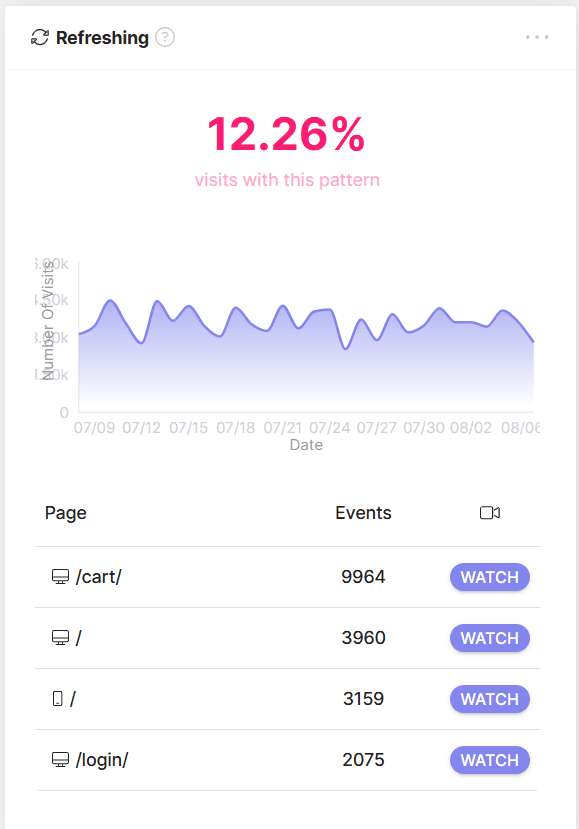
To understand the reason why your visitor had to refresh the content, view the recording of the visits by pressing 'WATCH'.
What is Refreshing on a Website? Refreshing is a pattern which occurs when users reload a webpage right after it has loaded or keep reloading the page repeatedly in short intervals. We consider at least 3 page loads within a time frame of less than or equal to 5000 ms. Automatic refreshes (such as refreshing a cart page after each change of a product amount) also counts to a Refresh Experience Metric.
Why Do We Refresh a Website? Users may Refresh a website due to slow page load times, page elements not loading correctly, or misplaced or misaligned parts of the page. Some page elements, such as photos, graphics, and links, may not have loaded correctly or at all, and users may hope to see these elements in their proper places.
Why Should Website Owners Care About Refreshing? When users keep Refreshing a website, it's a clear indicator that they're experiencing a negative user experience. It can mean the website is not performing well and may cause users to leave the website or reduce their engagement. This, in turn, can negatively impact the website's overall success and hinder its ability to achieve its primary goals.
Real World Refreshing Example: Imagine someone changing the quantity of products in a cart by clicking the '+' button. After each added item, the page automatically reloads itself and it takes a couple of seconds for changes to be shown on a page. After 3-4 of such reloads, the user may become too frustrated and will be less willing to make another purchase in this shop, especially if the cart page loads slowly and there’s no other way to change the product quantity.