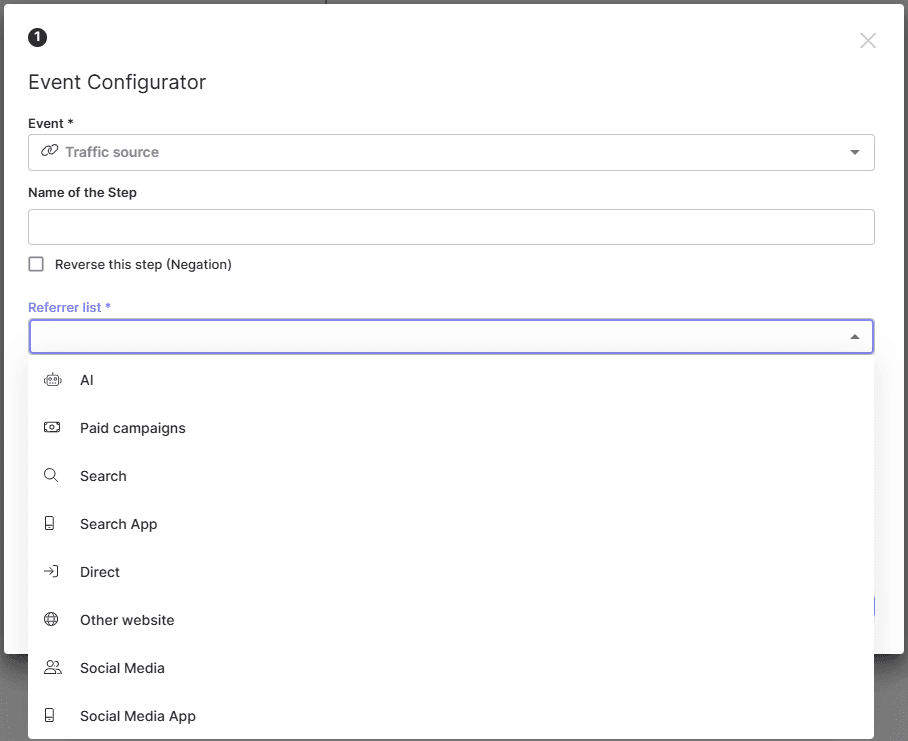
Traffic source events are most useful when it comes to tracking visitors coming to you from external sources. For your convenience we’ve grouped all incoming traffic into groups by type. To set a Traffic source event:
- Choose the event “Traffic source”;
- Type the Name of the Step (optionally);
- Choose a referrer from the list:
- AI - visits coming from AI-driven assistants or recommendation systems.
- mPaid Campaigns - traffic generated by paid advertising campaigns (such as display ads or PPC).
- Search - visits from search engines when the link is opened in a standard web browser (e.g., Chrome, Safari, Firefox).
- Search App - visits from dedicated search applications (e.g., Google app, Bing app) when the link is opened in the app’s built-in browser, not in a regular browser app
- Direct - traffic without a referrer. This may happen when users type the URL directly, use a bookmark, or when the browser or application does not send referrer information.
- Other Website - traffic referred from external websites that are not categorized as AI, search engines or social platforms.
- Social Media - visits from social networks when the link is opened in a regular browser.
- Social Media App - visits from social networks when the link is opened inside the app’s built-in browser (e.g., Facebook, Instagram, TikTok).
- Save the event.