See what’s new
We gave the CUX app a fresh new look. Experience metrics widget got an upgrade: You can now click ‘View More’ to open a full list of all pages where the selected pattern occurred, complete with device type and event counts.
Check details in the video
The Zoom widget displays the number of visits exclusively on mobile devices in which visitors had to zoom in or out on your website's content.
Example In this example, you can see that a Zoom occurred in 0.19 % of visits. Below the graph, you can find the pages where zooming occurs most frequently, along with information about the device and the total number of zoom events that have ever occurred on that specific page.
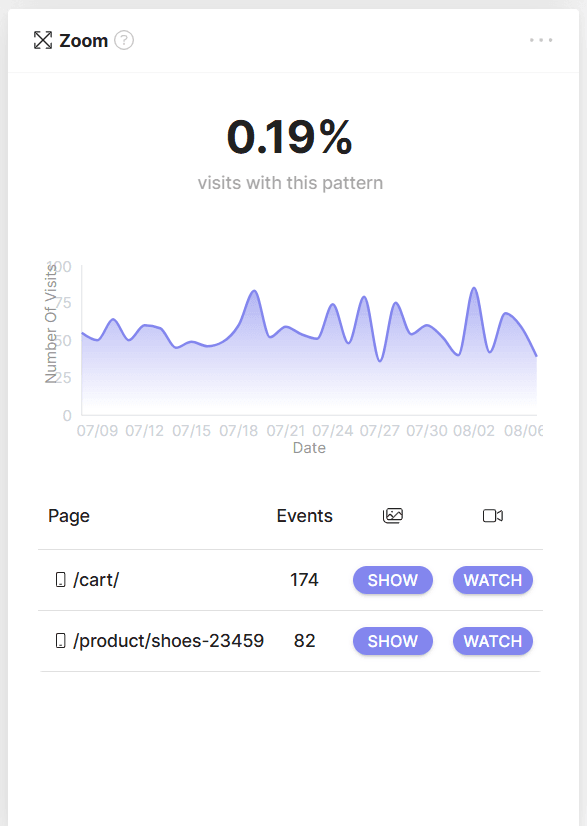
To view the areas of the page your visitors are zooming on, click 'SHOW' to access the heatmap, or 'WATCH' to see a list of recordings where this Experience Metric occurred on the selected page.
What is Zooming on a Website? Zooming is happening when you make things bigger or smaller on a website (like text, pics, and graphics) by pinching or spreading your fingers on your phone's screen.
Why Do We Zoom on a Website? People zoom for all sorts of reasons, like when text or images are too small, when they need to hit tiny checkboxes, or when the website isn't really designed for mobile devices. Sometimes, they just wanna take a closer look at the images.
Why Should Website Owners Care About Zooming? Zooming might mean your visitors aren't having the best time on your site. It could be a sign that your content isn't as easy to access as it should be.
Real-World Zooming Example: Imagine someone's shopping for clothes on their phone, and they keep zooming in to check out the fabric texture. That might mean your website's product images aren't as clear as they could be.