April 22, 2026
9 min read
User Flow analysis: Reveal the real path behind every conversion
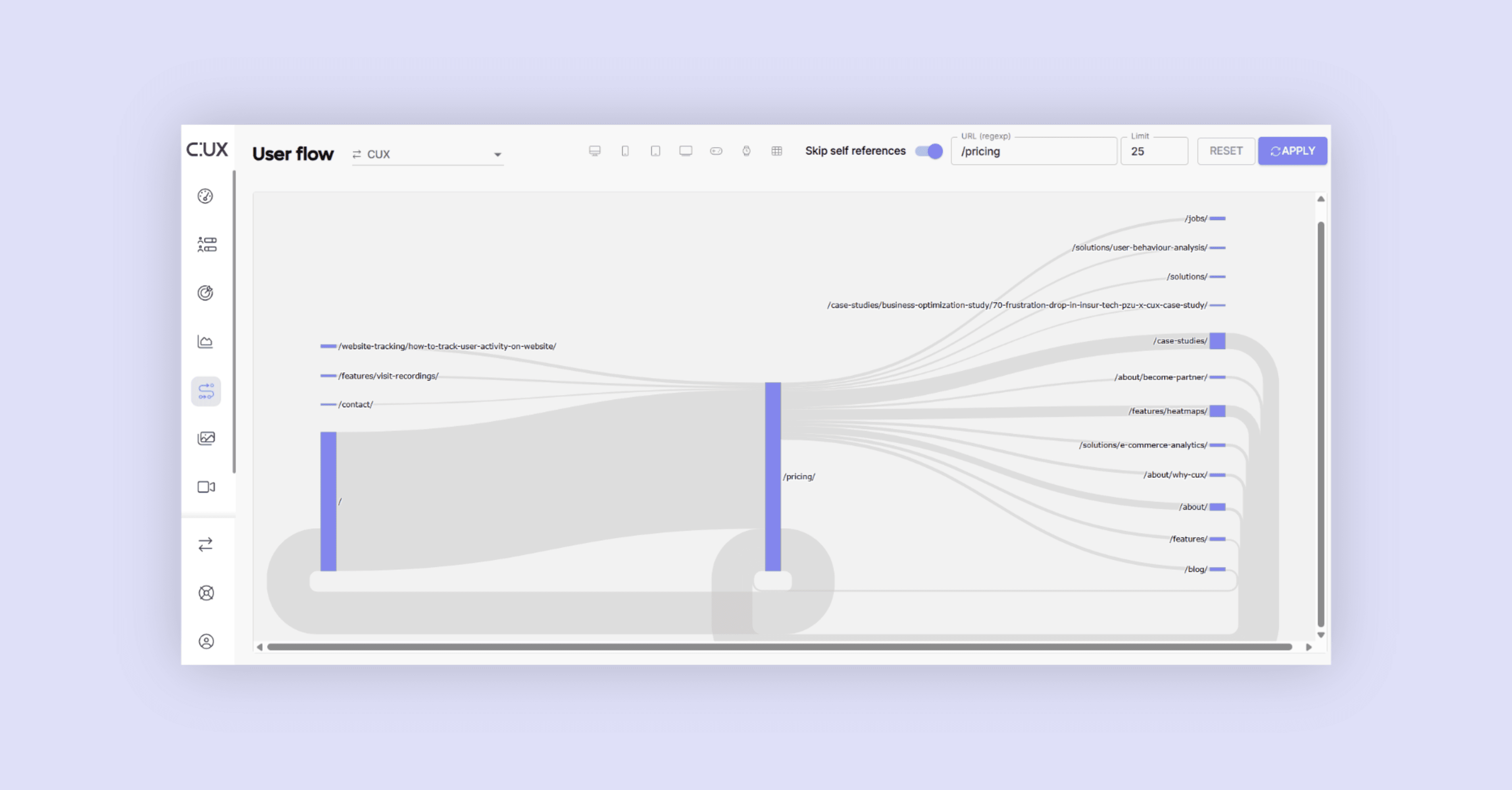
Your website may look like a straight path, but users rarely follow it as planned. User flow analysis is one of the most underused conversion rate optimization methods - it shows the real routes people take, where they drift, and what actually drives conversions. CUX User Flow makes this visible in seconds.

Agata Olbrycht
Content Strategist @ CUX

User flow analysis is the process of mapping how visitors actually navigate a website - the real paths they take from entry to exit, not the ones you designed. It reveals where users start, which pages they visit in sequence, where they loop back, and where they leave. Unlike funnel analytics, which tracks a predefined linear path, user flow analysis with CUX is open-ended - it shows you patterns you didn't expect.
TL;DR
- User flow analysis shows how visitors actually navigate your website - the real paths from entry to exit, not the ones you designed. CUX visualizes this as an interactive Sankey diagram.
- Most teams assume users follow a linear journey (homepage → product → cart → checkout). In reality, they loop back, skip steps, compare pages, and take shortcuts that never appear in standard conversion rates analytics.
- User Flow is the map (where are users going?). A Conversion Waterfall is the magnifying glass (where exactly do they drop off in a specific funnel?). Together, they form the diagnostic foundation of conversion rate optimization.
Stop guessing how users navigate; visualizing the actual user flow with CUX reveals hidden shortcuts, loops, and points of user frustration in the customer journey map, showing you exactly where to optimize for higher conversions.
You've built your website with a clear journey in mind. But your users, with their own goals and questions, navigate it their own way every single day. They take shortcuts, wander through unexpected pages, and often get lost in ways you never anticipated.
It’s hard to make sense of all that just by looking at traditional analytics.
That’s why we added the User Flow to CUX - a feature that shows how people move through your website, step by step. It's the starting point for any serious conversion rate optimization effort, because you can't fix a journey you haven't mapped.
What is User Flow analysis and how does it support conversion rate optimization?
User Flow is a visual feature that translates your raw data into a dynamic Sankey diagram - a clear, interactive map that lets you observe the paths users take from entry to exit. At a glance you see:
- True entry points – where journeys actually begin (not just the homepage)
- Popular pathways – the most common page-to-page sequences
- Significant exits – the moments where users most often leave
This high-level view makes it easier to spot navigation patterns, drop-offs, content bottlenecks, and points of user frustration that block progress. It also helps you decide which Waterfalls are worth building, so you can focus on fixing broken paths or removing friction from key conversion steps.
Before we go further, let’s clarify what a Waterfall actually is.
What is a Conversion Waterfall?
Think of it as a step-by-step funnel that shows where people drop off. It could track a checkout, a sign-up, or any process you define. You set the key steps, and this feature pinpoints where most visitors abandon the journey.
A typical checkout waterfall might look like this:
- Viewed Product Page
- Added to Cart
- Proceeded to Checkout
- Entered Shipping Information
- Completed Purchase
It’s called a ‘waterfall’ because you can observe that with each step, fewer users continue with the process. The visual makes it easy to see where you’re losing people and where your flow needs fixing.
User Flow vs. Conversion Waterfall: The map and the magnifying glass
While both User Flows and Conversion Waterfalls are visual tools that help you understand user behavior, they answer very different questions and give you the clearest picture when viewed together.
The core difference
User Flow is the map: It helps you discover how users navigate your site, without preconceived notions. It shows you all the common paths users take - the ones you designed and the surprising ones you didn't. It answers the open-ended question: "Where are my users really going?"
A Waterfall is the magnifying glass: It lets you diagnose a specific, linear conversion path that you have already defined. You tell the Waterfall the exact steps you expect users to take (e.g., a checkout funnel). It then shows you precisely where users ‘leak’ or drop off within that specific process. It answers the question: "In this specific funnel I've defined, where are people leaving?"
How to use User Flow analysis to increase conversion rate: Practical applications by industry
Teams working on complex user journeys, from applications to bookings, rely on User Flow to see where people stall, backtrack, or leave entirely.
How User Flow analysis diagnoses friction in finance and SaaS
Take financial services. A long card application process often hides small obstacles that cause frustration. User Flow can show when people are dropping off, because they’re stuck, circling back to the same step to fix details or re-enter information. It also reveals where the customer journey splits, depending on their choices or context. A different menu option or using a mobile device can send someone down a completely different path.
This can point to issues like unclear form validation, confusing branching logic, or layouts that behave differently on various devices - problems that often go unnoticed without advanced behavioral analytics tools to visualize them..
For SaaS teams, User Flow reveals how people move between the features page, pricing, and sign-up. It shows where they hesitate, exit, or loop back, pointing to moments of doubt or confusion. You can follow the full onboarding path and spot where interest drops. These insights help you clarify messaging, or tweak layout, all to increase sign-ups and support retention.
Discovering your true conversion drivers
Often, the path that leads to a conversion isn't the obvious one you've heavily promoted. User Flow helps you discover which routes are actually working.
Think of an insurance website focused on generating leads. With dozens of pages on your site, it’s not always obvious which ones actually lead people to the contact form. User Flow gives you a clear view of the real entry points that trigger action, allowing for more effective customer journey optimization.
That might mean prioritizing SEO for those pages, adding trust signals like testimonials, or strengthening internal links to guide more traffic through proven paths.
The same goes for an e-learning platform. User Flow shows the paths that lead to actual sign-ups, tracing how engaged visitors move between blog posts, course descriptions, and the registration form. It reveals which content helps people decide to enrol, and which pages cause them to leave the site.
That knowledge can help you adjust CTAs, rework underperforming content, or promote the pages that consistently lead to conversions.

Making sense of non-linear customer journeys
Real user behavior is rarely a straight line, but this new feature helps make sense of complex patterns by visualizing them clearly.
In e-commerce, User Flow might reveal how many people skip the cart page entirely and head straight to checkout. That kind of insight helps you build more accurate Waterfalls based on how buying decisions actually unfold. You can also see what happens after someone visits the cart but doesn’t complete the purchase - if they compare products, check the return policy, or leave the site.
The way people behave around the cart tells you if it's helping them complete the purchase, or making them stop, rethink, or exit. You might decide to surface key info earlier, add reassurance like trust badges, or test cross-sells where people tend to stall.
When it comes to the travel sector, we know that users often compare multiple options before booking. They switch between accommodation listings, availability calendars, and price breakdowns. User Flow helps you see how they explore the site, which steps hold their attention, and where they drop off. It shows whether people abandon the process while browsing or during the final booking stage.
That information can point to issues like missing pricing details, unclear availability, or distractions on the page, all of which can be fixed to make booking feel easier and more trustworthy.
Your website's story is ready to be discovered
For too long, understanding user behavior has been a matter of stitching together fragmented data and making educated guesses. User Flow changes that. It's one of the most powerful conversion rate optimization best practices because it replaces assumptions with evidence - showing you exactly where users struggle, where they succeed, and which paths actually lead to revenue.
Combined with visit recordings that show why users drop off and experience metrics that flag frustration signals, User Flow gives your team a complete diagnostic toolkit.
Curious what paths your users actually take?
Book a conultation and let’s find out together. We’ll help you spot the patterns, and the problems hiding in plain sight.
FAQs
Q: How is User Flow different from a Customer Journey Map?
A: A customer journey map is often a strategic document outlining the ideal path you want users to take. CUX user flow analysis, on the other hand, shows the actual path users take on your website, revealing the messy reality, loops, and shortcuts that the theoretical map often misses.
Q: Can CUX User Flow help identify why users leave?
A: Yes. By visualizing where the flow stops or loops back (e.g., users going from Checkout back to Cart repeatedly), you can identify specific bottlenecks and user frustration points that cause drop-offs, allowing you to fix the broken conversion path.
Q: Do I need advanced technical skills to analyze User Flows in CUX?
A: Not with modern behavioral analytics tools. CUX visualizes this data automatically using Sankey diagrams, so you don't need to be a data scientist to see the patterns. It turns complex tracking website analytics into an easy-to-read visual map.
Q: How does user flow analysis support conversion rate optimization?
A: User Flow analysis is the diagnostic starting point for conversion rate optimization. It shows where users stall, backtrack, or exit, which tells you which parts of the journey need fixing. Without it, teams guess which pages to optimize or run A/B tests based on assumptions. With User Flow data, you know exactly which paths lead to conversions and which don't. You can then build targeted Conversion Waterfalls for the problem areas, watch visit recordings to understand the root cause, and make changes grounded in real behavior. It turns conversion rate optimization from a guessing game into a structured, evidence-based process.